Queue calls only reach you when your status, your dialer tab and your agency's setup all line up. Work through the sections below that match what you see. The first part is for agents; the admin checklist at the end is for supervisors and agency admins.
My status is not Available
Queue calls go only to agents who are Available. Every other status (Busy, In a Meeting, Lunch, Break, Training, Disconnected) stops them, and Disconnected leaves you with calls to your own direct number only.
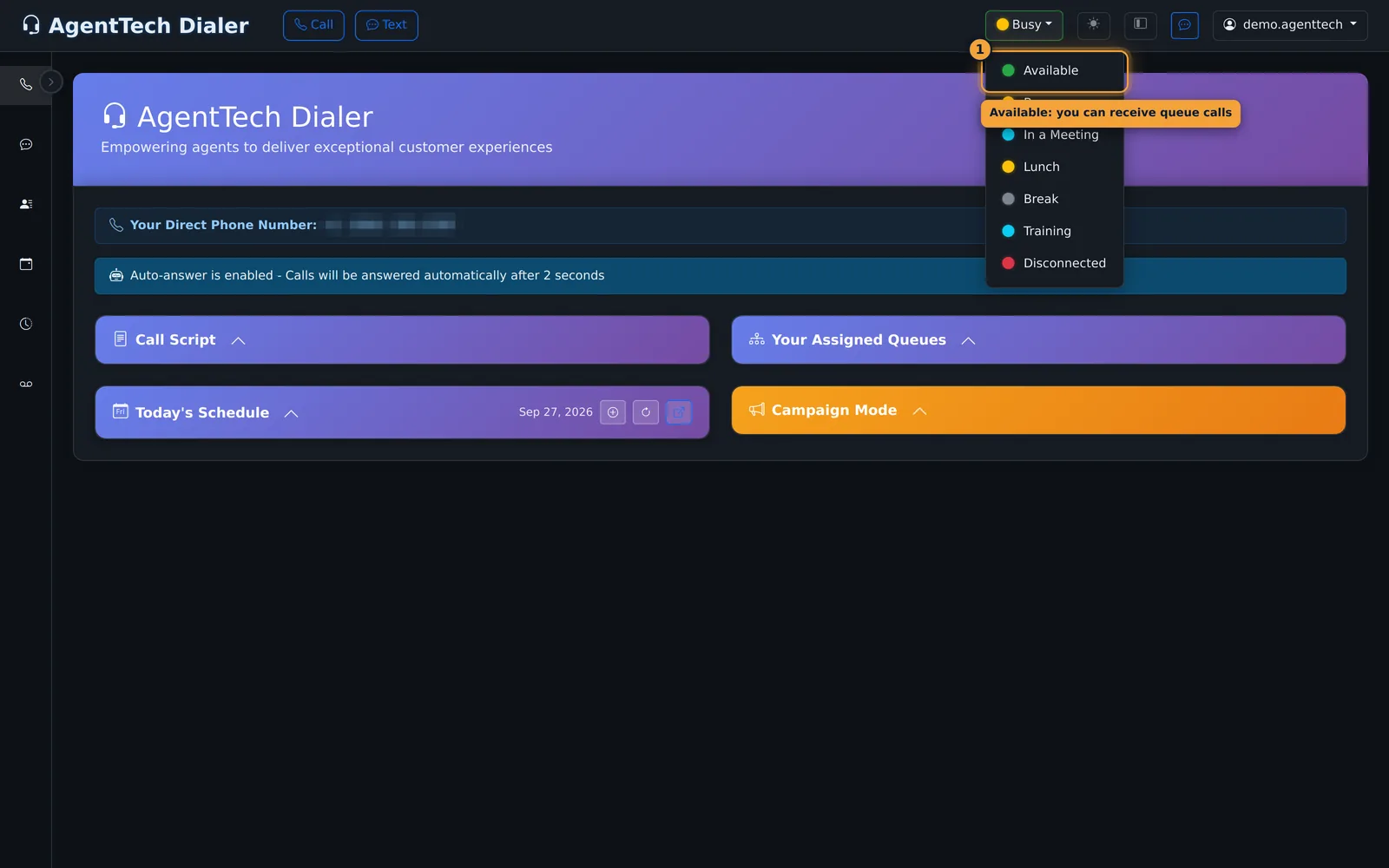
Fix: open the status menu in the top bar and select Available. The button turns green. If Available is greyed out, the dialer is still connecting; wait a few seconds and allow microphone access if the browser asks.
My status keeps going back to Disconnected
The dialer sets you to Disconnected when it can no longer deliver calls to you. The usual causes:
| Cause | Fix |
|---|---|
| You opened another page (Contacts, Call Log, Settings...) in the same tab as the dialer. Leaving the dialer page disconnects you, even during a call. | Open other pages in a new tab (Ctrl-click or middle-click the sidebar link) and keep the dialer tab open. |
| You chose Available on a page other than the dialer, with no dialer tab open ("Status changed to Disconnected - Available status not valid on non-dialer pages"). | Go back to the dialer home page and set Available there. |
| The browser lost access to your microphone, for example the headset was unplugged or another app took it. The dialer shows "Status changed to Disconnected - Microphone access lost". | Reconnect the headset, then see Softphone & Microphone Problems. |
| Your internet connection dropped ("Status changed to Disconnected - LiveKit disconnected" or "SIP registration lost"). | Check your network, then set Available again once the page has reconnected. |
| You missed or declined a call and your agency moves agents to another status when that happens. | Set Available again. Answer calls promptly, or turn on auto-answer if your agency lets you (Settings > Call Settings). |
| You were idle past your agency's inactivity timeout, or your sign-in session expired. | Sign in again. You can choose a longer Session Timeout under Settings > Security. |
See Making & Receiving Calls for how to work with the dialer open.
I see "Multiple Dialer Tabs Detected"
You can have one dialer tab at a time. A second one stops the connection and shows this message.
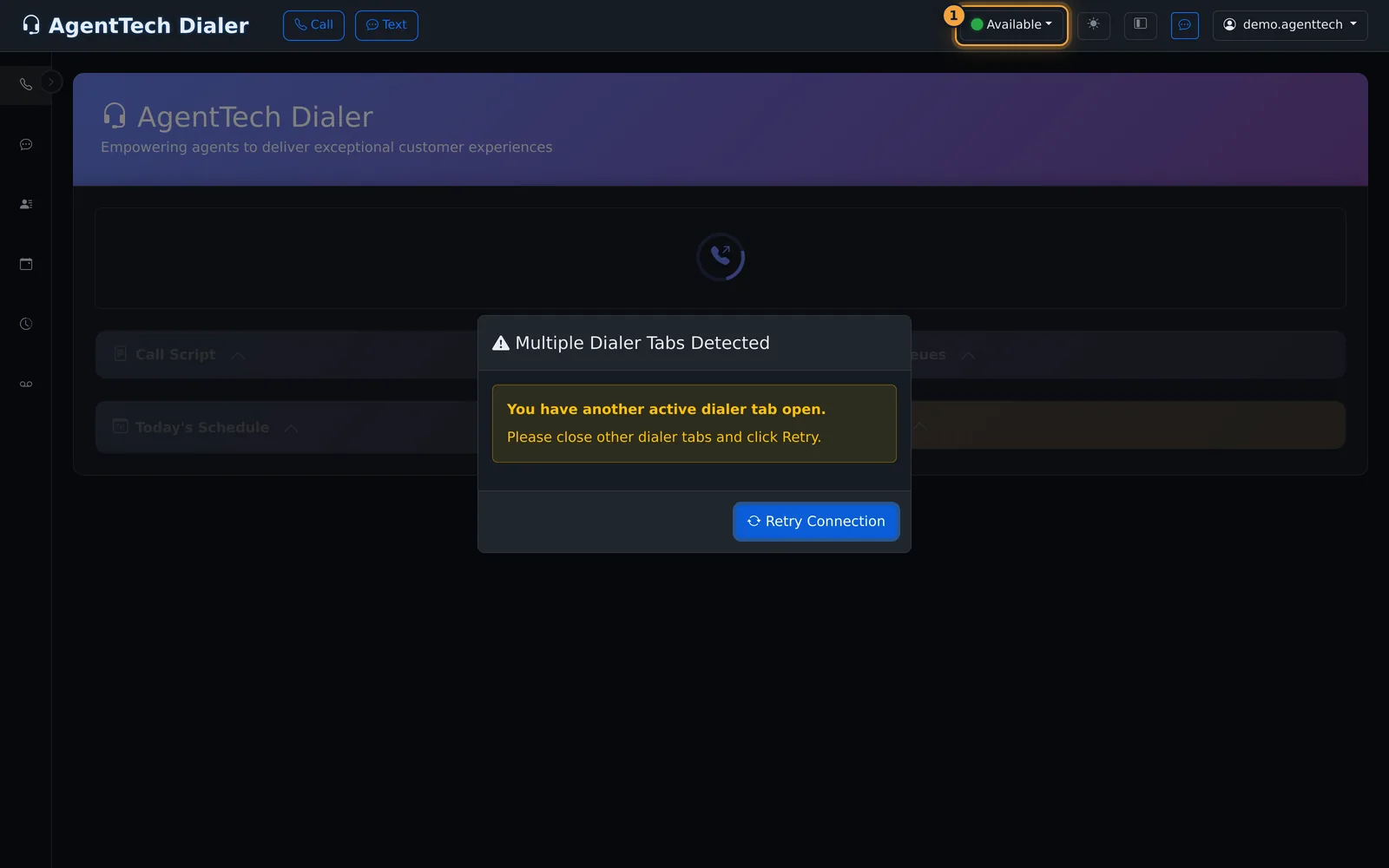
Fix: close the other dialer tab (check other browser windows too), then select Retry Connection in the tab you keep.
I'm Available but nothing arrives
- You are not in a queue. Open Your Assigned Queues on the dialer home page. If it is empty you only receive calls to your direct number; ask your supervisor to add you to a queue.
- You are not licensed for the caller's state, or lack a skill the queue requires. Queues can accept only agents licensed in the caller's state or with a given skill level. Ask your admin to check your states and skills.
- The queue is closed. Outside a queue's opening hours no calls are offered from it. Ask your supervisor for the queue's hours.
- You reached a call cap. A Call Cap Reached banner means your limit for the period is used up. You stay connected and can still dial out; queue calls resume when the cap resets.
- You are dispositioning. While the Call Disposition form is open your status is Dispositioning and no new calls come in. Submit the form to go back to your previous status.
- It is simply quiet. Check the Call Log for missed calls, and ask your supervisor whether calls are waiting on the dashboard.
The dialer says the agency is overdrawn
Calls need funds in the agency wallet. When the balance falls below the agency's limit, the dialer sets agents to Disconnected with an "agency overdrawn" message. An admin needs to add funds; see Adding Funds & Auto-Recharge.
Calls ring but I miss them
- Turn up your speakers and allow desktop notifications so an incoming call alerts you when the dialer tab is in the background. See Notifications & Alerts.
- Keep your computer awake; a sleeping computer cannot answer.
- With auto-answer off, a call you don't answer in time moves on to the next agent.
Admin checklist
If an agent is Available and still gets no queue calls, check these in order:
- Queue membership: the agent is on the queue's Agents tab. See Queue Management.
- Hours: the queue's Hours tab has today open. New queues start with every day closed.
- States and skills: the agent is licensed in the states the queue accepts and meets any required skill level. See Skills and State Licensing.
- Call caps: no cap on the agent, queue, number or publisher has been reached. See Call Caps.
- Queue options: Find Next Agent is on if you want a missed call to try another agent before overflow.
- Missed-call status and timers: under Agency Settings > Call Settings, check Change Status on Missed/Declined Call, Ring Timeout, Inactivity Timeout, Require Call Disposition and Dispositioning Time. See Agency Settings.
- Wallet: the balance is above the agency's limit. See Billing & Your Wallet.
- Number routing: the phone number callers use points to the right queue. See Phone Numbers.
- Agent account: the agent's active switch is on in Agents. See Managing Agents.
The Supervisor Dashboard shows each agent's live status, which helps confirm step one before you look further. If everything checks out, see Getting Help & Contacting Support.
Related articles
Was this article helpful?
Can't find what you are looking for? Our support team can help.
Submit a support ticket