Transcript
Compliance analysis sends each call's transcript to AI with your questions, scores the answers into a pass rate, and writes a short sales review. Here is how to read the results.
Open the Call Log, and find the call. Tick All Time, or search by a word from the transcript.
Select Compliance Check, the shield button, to open the call's results.
Compliance Overview shows four numbers: the pass rate, the questions passed and failed, and how many questions count toward the pass rate.
Sales Call Analysis is AI's written review, in sections such as the reasons for the sale or no sale, missed opportunities, and objection handling.
Compliance Summary lists every question with the answer AI gave. Yes and True show in green, No and False in red, and other answers as given.
Review calls with a low pass rate first, and listen to the recording where an answer matters. AI answers from the transcript only.
If a question fails on calls where the agent did say it, reword the question more concretely on the Compliance page.
Next, see how to write and manage your agency's compliance questions.
Compliance analysis sends a call's transcript to AI with your compliance questions. AI answers each question, the answers are scored into a pass rate, and AI writes a short sales review of the call. Supervisors use the results to find calls to review and coach.
This article is for agency admins and supervisors. For the questions themselves, see Managing Compliance Questions; for the big picture, see Compliance Overview.
Compliance must be turned on and your questions set up first; see Compliance Overview. Each analysis answers the platform questions set by AgentTech, your active agency questions, and a request for a written sales review.
Read the results
- Open Call Log and find the call. Widen the date range or tick All Time if needed.
- Select Compliance Check (the shield button). It appears when Call Compliance is on and the call has a recording or transcript and lasted at least 30 seconds (or already has a transcript).
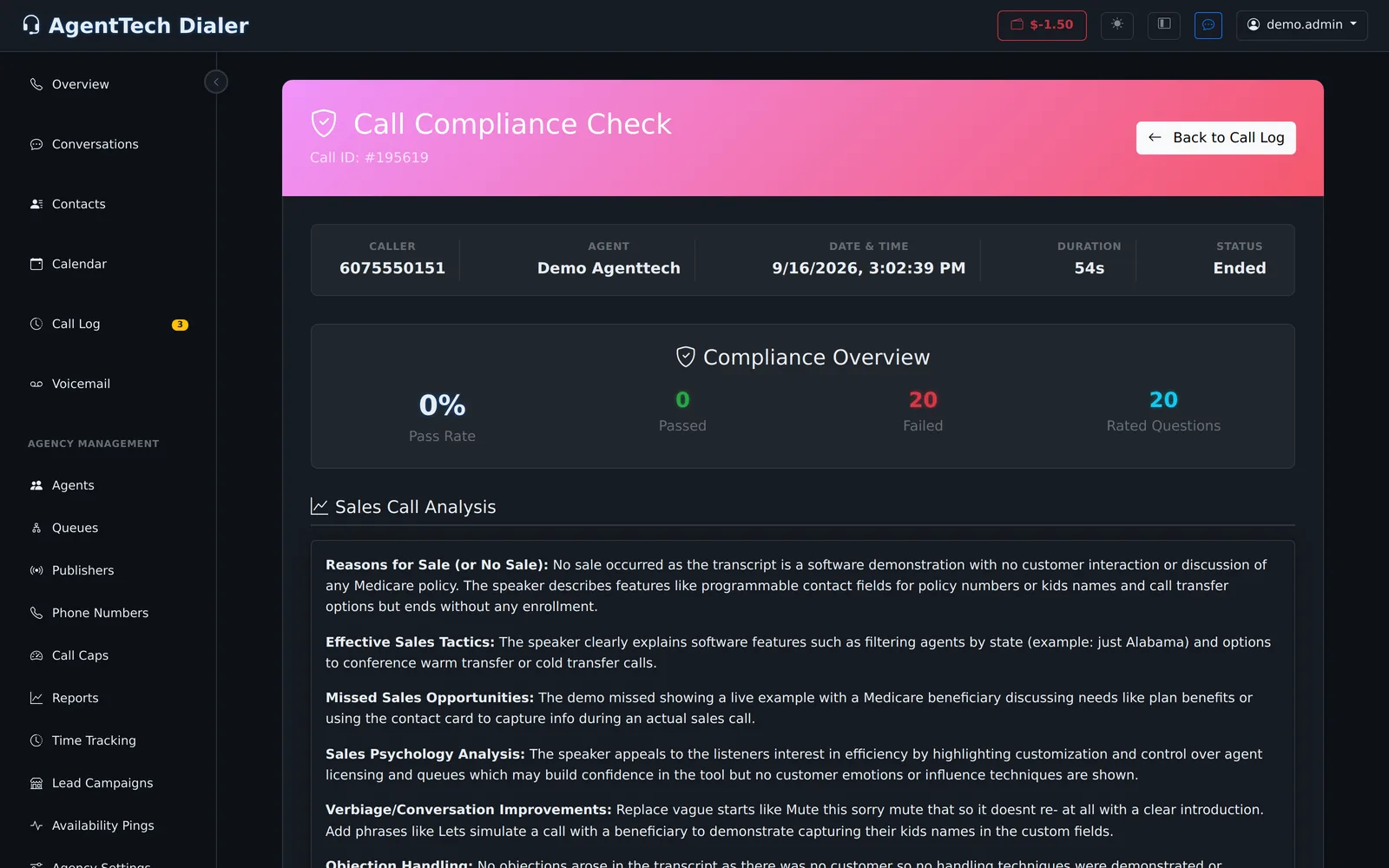
Compliance Overview shows four numbers:
| Number | Meaning |
|---|---|
| Pass Rate | Passed divided by Rated Questions, as a percentage. |
| Passed | Rated questions whose answer didn't fail. |
| Failed | Rated Yes/No or True/False questions answered No or False. |
| Rated Questions | Questions that count toward the pass rate. Questions you excluded are answered but not counted. |
Sales Call Analysis is AI's written review, in sections such as Reasons for Sale (or No Sale), Effective Sales Tactics, Missed Sales Opportunities, Sales Psychology Analysis, Verbiage/Conversation Improvements and Objection Handling.
Compliance Summary lists every question with its answer. Yes and True show green, No and False red; carriers, names and text answers show as given, with long answers shortened (hover to read the rest). "(Not Analyzed)" means the question has no answer for this call.
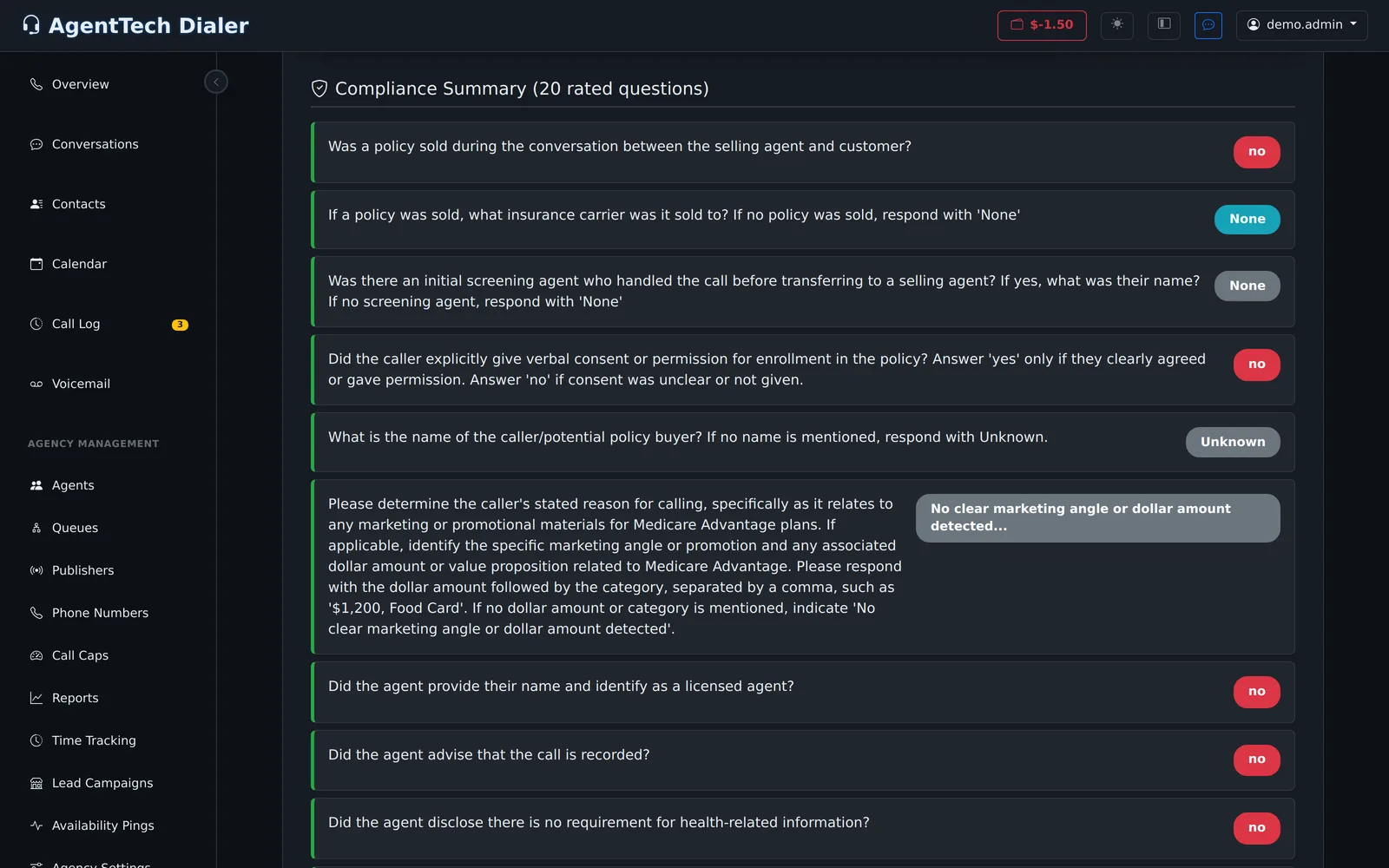
When AI answers Yes to "Was a policy sold...", the status in the call bar changes to Sold and that question is not repeated in the list.
Use the results
- Review calls with a low pass rate first, and listen to the recording where an answer matters.
- Coach from the Missed Sales Opportunities and Verbiage/Conversation Improvements sections.
- If a question fails on calls where the agent did say it, reword the question more concretely. See Managing Compliance Questions.
Common problems
- No Compliance Check button: Call Compliance is off, or the call has no recording or transcript, or it was under 30 seconds.
- "No Compliance Data": the call hasn't been analysed.
- Every question failed on a call: check the transcript. In the example above, the call was a software demonstration, not a sales call, so every disclosure was answered No.
Related articles
Was this article helpful?
Can't find what you are looking for? Our support team can help.
Submit a support ticket