A team is a named group of users, for example Medicare Enrollment or Evening Shift. Teams organise your agents, and Reports shows a team performance table with each team's calls, sales, cost per sale and conversion rate.
This article is for agency admins. Open Agency Management > Teams.
Create a team
Until you create one, the page shows "No teams have been created yet" with a Create Your First Team button.
- Select Create Team at the top right.
- Enter a Team Name (required).
- Leave Status on Active, or choose Inactive to set the team up without using it yet.
- Add a Description of the team's purpose.
- Under Team Members, tick each user who belongs to the team. Click anywhere on a row to tick it, or type in the search box to find someone. Every user in the agency is listed, including admins.
- Select Create Team.
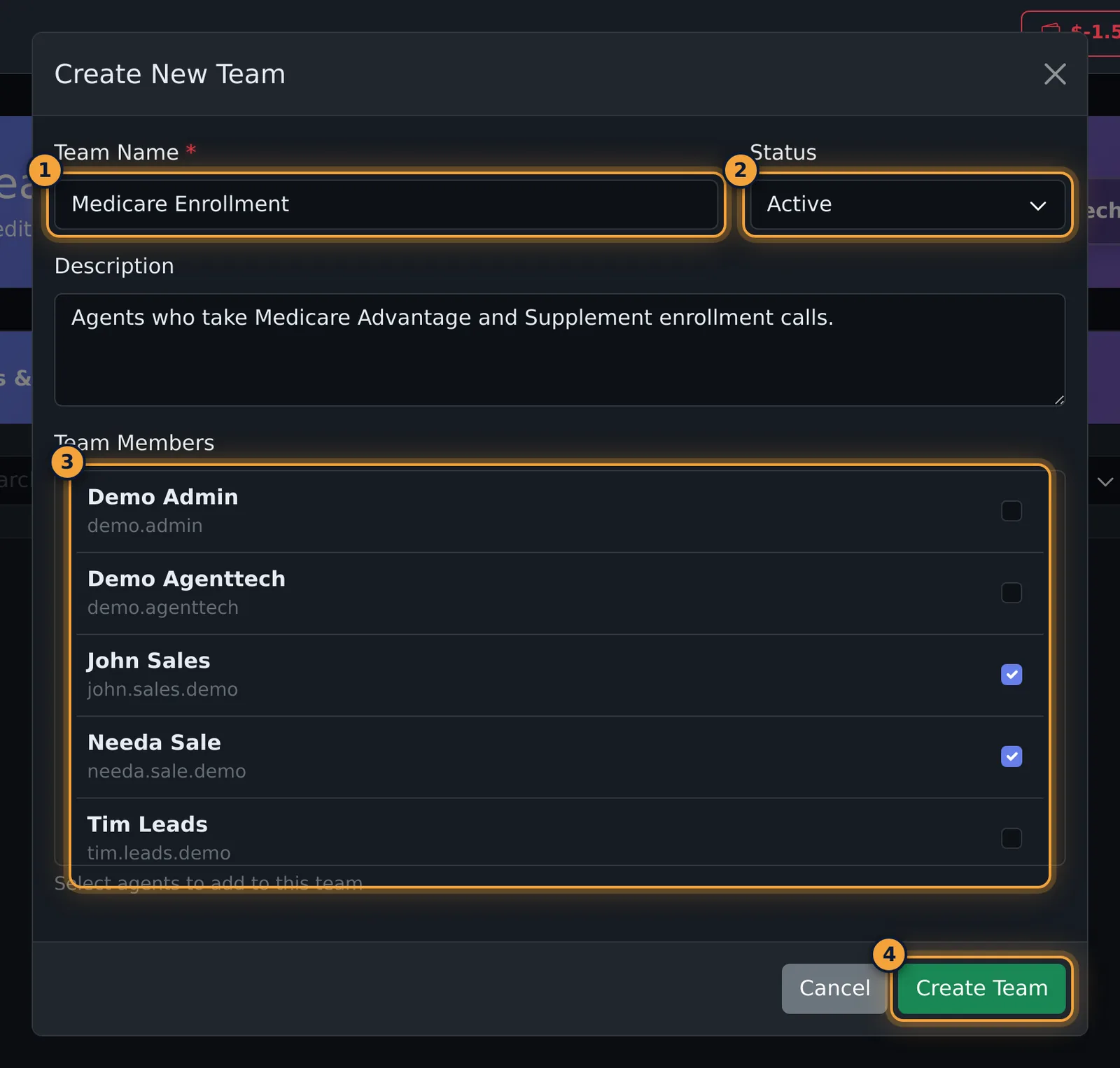
| Field | What it does |
|---|---|
| Team Name | Required. Shown on the team card and in reports. |
| Status | Active or Inactive. Inactive teams stay on the page and can be shown with the status filter. |
| Description | Optional note about the team's purpose. |
| Team Members | Tick the users in the team. You can change members later. |
Find a team
- Search matches the team name or description.
- The status filter shows All Teams, Active or Inactive.
- Grid shows cards; List shows a table with status, name, description and member count.
Each team card shows the name, description, an Active or Inactive badge, up to four member initials and the member count, with Edit and delete buttons.
Edit a team or its members
Select Edit on the team's card. Edit Team has two tabs and one Save Changes button:
- General: Team Name, Status and Description.
- Members: the agency's users on the left and the team's members on the right. Select + to add a user and x to remove a member. Nothing changes until you save.
Delete a team
Select the bin on the team's card, check the team name, and select Delete Team.
Common problems
- I can't find the delete button. Supervisors can't delete teams; ask an agency admin.
- Where do I set up departments? There are no departments in AgentTech Dialer. Use teams to group agents, and queues to route calls (Queue Management).
Related articles
Was this article helpful?
Can't find what you are looking for? Our support team can help.
Submit a support ticket