Transcript
Here is how to join an agent's call in progress: listen in, whisper coaching only the agent hears, or barge in.
Open Overview, the supervisor dashboard. The counters at the top show how many agents are online, and how many are on a call.
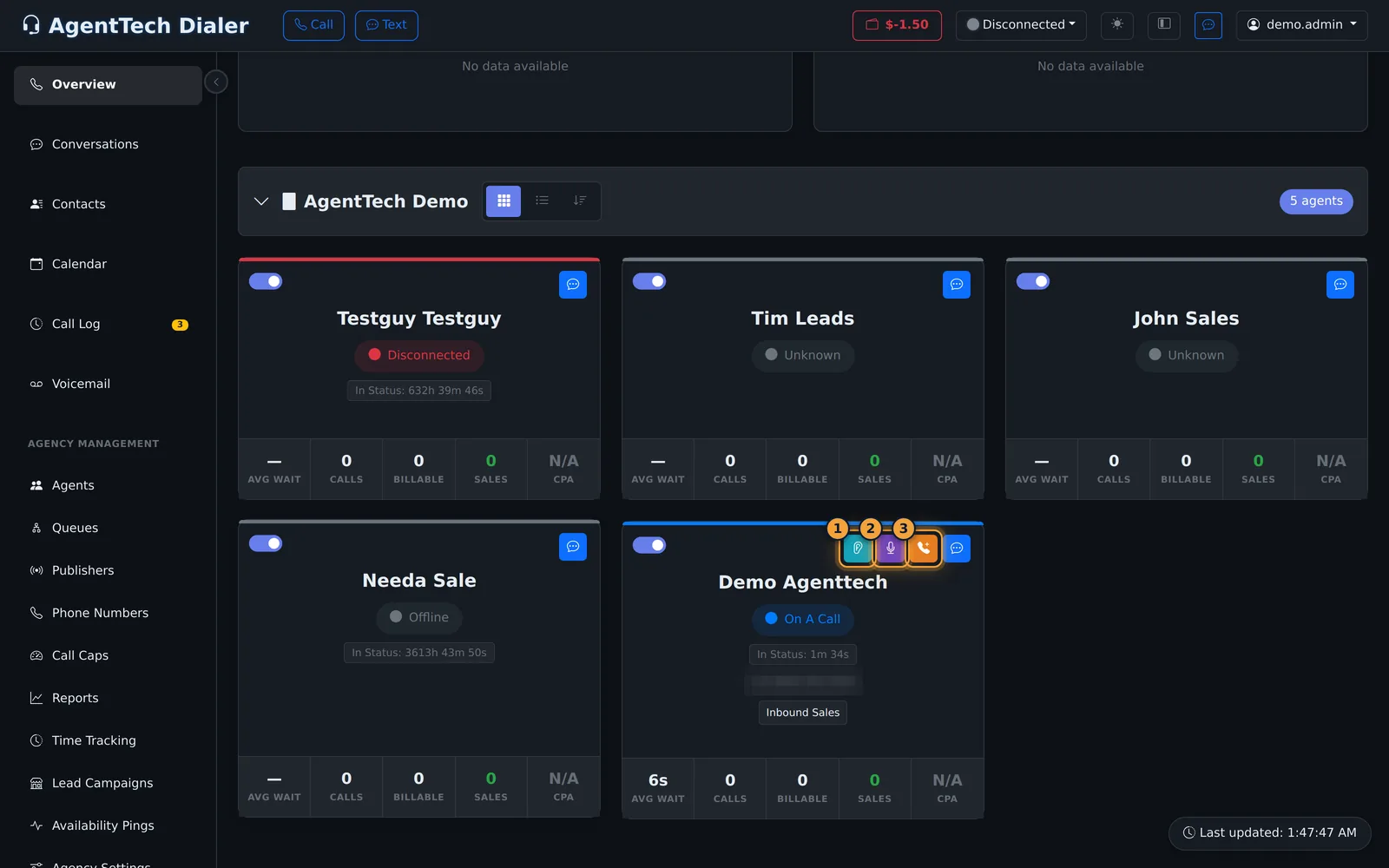
Expand your agency's agents. The card of an agent on a call shows On A Call, the time in that status, their number, and their queue.
While the call lasts, three buttons appear at the top of the card: Listen, Whisper, and Barge In.
Listen is silent monitoring for quality checks. You hear the whole call, and nobody hears you.
Whisper is for coaching. You hear the call, and only the agent hears you, not the caller.
Barge In makes you a full participant, so everyone on the call hears you. Each one connects as soon as you select it, through your headset.
While you monitor, a panel shows the mode and the agent. Select its X to stop.
Monitoring is never hidden. The agent's dialer shows who is coaching, whispering, or has joined their call.
Next, see how supervisors can take calls themselves.
Supervisors can join an agent's call in progress from the Overview dashboard: listen for quality checks, whisper coaching that only the agent hears, or barge in to speak to everyone on the call. This article is for supervisors and agency admins.
Find the call
- Open Overview (the supervisor dashboard). The counters at the top show how many agents are online and On Call.
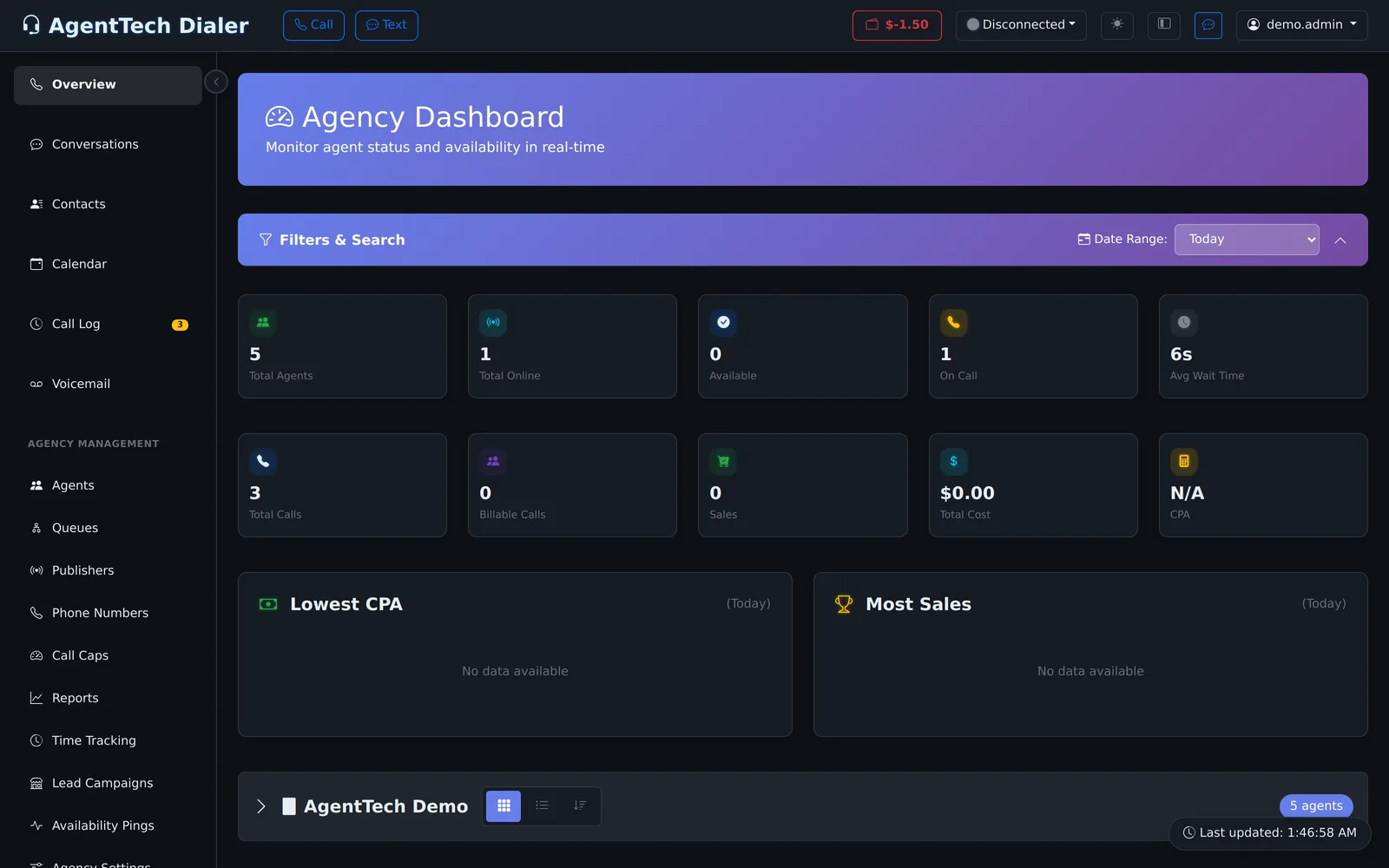
- Expand your agency's agent list. The card of an agent on a call shows On A Call, the time in that status, their number and queue.
- Three buttons appear on that card while the call lasts: Listen, Whisper and Barge In.
The three modes
Each button connects you as soon as you select it, through your browser's headset.
| Mode | You hear | Who hears you | Microphone |
|---|---|---|---|
| Listen | The whole call | Nobody | Not needed |
| Whisper | The whole call | Only the agent - the caller and other supervisors do not | Required |
| Barge In | The whole call | Everyone on the call | Required to speak |
- Listen is silent monitoring for quality checks. A Listen Volume slider sets how loud the call is for you.
- Whisper is for coaching: prompt the agent with an answer or a next step while they keep talking to the caller. Allow microphone access when your browser asks.
- Barge In makes you a full participant, for example to take over a difficult call. Barging replaces Listen or Whisper. If your browser has no microphone access you can still hear the call, but not speak.
If the agent is between calls, Listen connects you to the agent's microphone so you can hear them, for example during a training session.
The monitoring panel
While you monitor, a panel shows the mode and the agent, for example Listening: Jane Smith, with a line for the active mode (Listen: Active, Whisper: Active or Barge-In: Active (full audio)), the call ID and the volume slider. When the call ends and the agent is choosing a call outcome, the panel says Agent is dispositioning.
Stop monitoring
Select the X on the monitoring panel. The session also ends when you close or leave the page.
What the agent sees
Monitoring is never hidden from the agent. Their dialer shows who is with them:
| Mode | Agent sees |
|---|---|
| Listen | "{supervisor} is coaching you" |
| Whisper | "{supervisor} is whispering to you" |
| Barge In | "{supervisor} joined your call" |
If you connect while the agent is not on a call, the agent gets a Supervisor connected notification. For the privacy side of monitoring, see Security, Privacy & Call Data.
Tips
- Listen first, then whisper only when it helps; short whispers are easier to follow mid-call.
- Use a headset so the agent does not hear an echo while you whisper.
- Recordings are often a better place for detailed feedback than a live whisper. See Call Recording.
Related articles
Was this article helpful?
Can't find what you are looking for? Our support team can help.
Submit a support ticket